How to Create Scroll-Stopping Product Content for Social Media with AI
You have about 1.3 seconds. That is roughly how long someone spends deciding whether to stop scrolling and actually look at your post. If your product content for social media does not grab attention in that tiny window, it gets buried under a pile of memes, vacation photos, and whatever else the algorithm decides to serve up next.
The good news? Creating visually striking product content has never been more accessible. You do not need a studio, a photographer, or a five-figure production budget. AI tools have changed the game completely, and the brands that figure this out first are the ones dominating feeds right now.
Let's break down exactly how to create product content that actually stops the scroll, platform by platform, and how AI fits into a practical daily workflow.
Why Visual Quality Matters More Than Ever
Social media algorithms are not mysterious. They reward engagement. Posts that get likes, comments, saves, and shares get shown to more people. Posts that get ignored disappear. And the single biggest factor in whether someone engages with a product post? The visual.
Think about your own scrolling habits. You probably skip right past product photos that look flat, poorly lit, or like they were shot on a kitchen counter with bad overhead lighting. But a product placed in a beautiful lifestyle scene, with perfect lighting and an aspirational vibe? That makes you pause.
The competition for attention is fierce. Millions of product images hit social platforms every day. Standing out requires visuals that feel polished, on-brand, and genuinely interesting. That is where AI social media content creation becomes a serious advantage.
Platform-Specific Tips That Actually Work
Not every platform wants the same thing. What performs on Pinterest will flop on TikTok. Here is what works on each.
Instagram (Feed, Stories, and Reels)
Instagram is still the home base for product discovery. For feed posts, square (1:1) or portrait (4:5) images with rich, lifestyle-driven scenes consistently outperform plain product-on-white shots. Think of your product on a sunlit marble countertop, nestled among complementary items, or placed in a setting that tells a story about who uses it and why.
For Stories and Reels, vertical video (9:16) is essential. Short clips showing your product in motion, even subtle movement like a slow zoom or a gentle rotation in a scene, dramatically outperform static content. Instagram's algorithm actively pushes Reels to new audiences, so this is your best growth channel on the platform.
TikTok
TikTok thrives on authenticity and motion. Product videos that feel overly produced can actually hurt performance here. What works is quick, dynamic content. Show the product in use, place it in unexpected settings, or create satisfying visual transformations. Short AI-generated product videos (3 to 8 seconds) make excellent raw material for TikTok posts. You can add voiceover, trending audio, or text overlays on top.
Pinterest is a search engine disguised as a social platform. Tall, vertical images (2:3 ratio) dominate here. Lifestyle imagery performs exceptionally well because people come to Pinterest looking for inspiration. A skincare product photographed in a spa-like bathroom setting, or a coffee mug in a cozy reading nook, fits perfectly into how people browse Pinterest. The key is making your product feel like part of an aspirational lifestyle.
Facebook and X
Facebook rewards content that sparks conversation, while X rewards content that is timely and shareable. For both platforms, landscape and square formats work well. Clean, high-contrast images with a clear focal point tend to perform best. Video content is increasingly prioritized on Facebook in particular, so even a short 5-second product clip can outperform a static image.
Creating Lifestyle Scenes with AI
Here is where things get really interesting. Traditionally, if you wanted a photo of your product in a beautiful kitchen, on a beach at golden hour, or in a minimalist Scandinavian apartment, you had two choices. Either you physically brought your product to that location (expensive, time-consuming) or you hired a retouching artist to composite it in (also expensive, and the results often looked fake).
AI product placement changes this completely. With a tool like Pixelus, you can take a simple product photo and place it into any scene you can describe. Want your candle on a rustic wooden table with rain-streaked windows in the background? Done. Want your sneakers on a rooftop with a city skyline at sunset? That too. The AI generates photorealistic scenes around your product, handling lighting, shadows, and reflections automatically.
The product placement feature in Pixelus is particularly useful here because it keeps your actual product looking accurate while building a completely new world around it. You are not distorting the product or making it look artificial. You are giving it context, and context is what makes people want to buy.
Using AI Video for Short-Form Content
If you are only creating static images for social media, you are leaving engagement on the table. Every major platform is pushing video content. Instagram Reels, TikTok, YouTube Shorts, Facebook video. The algorithm favors motion.
The problem has always been that video production is expensive and slow. Getting a few seconds of polished product footage used to mean hiring a videographer, renting equipment, and spending hours in post-production. That math does not work when you need fresh content multiple times a week.
AI video generation solves this. Pixelus lets you turn product images into short video clips, complete with camera movement, dynamic lighting, and environmental effects. A still image of your product in a cozy living room becomes a slow, cinematic pan across the scene. A product on a beach gets gentle waves and shifting light. These clips are short enough for Reels and TikTok, polished enough to feel professional, and fast enough to create that you can actually keep up with content demands.
You can also use the AI Mixer feature to blend different visual styles and elements together, creating something that feels fresh and unique rather than template-driven. It is a great way to develop a distinct visual identity for your brand across social channels.
Creating Variations at Scale
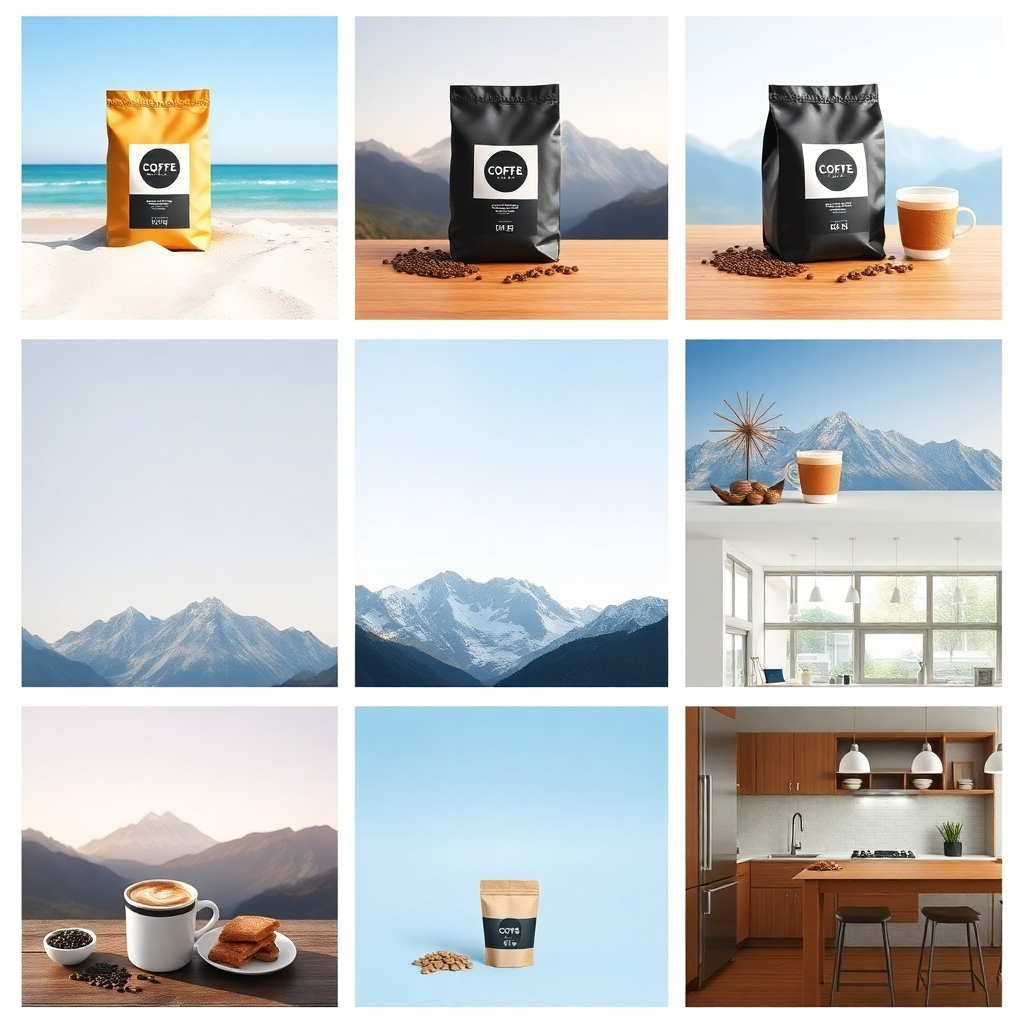
One of the most powerful (and underused) strategies in social media marketing is variation testing. Instead of posting one product image and hoping for the best, what if you could create ten different versions of the same product in ten completely different scenes and see which one resonates most?
With traditional photography, that is a week of shooting. With AI, it is an afternoon of work, at most. Here is a practical approach:
- Start with your product photo. Just a clean, well-lit shot of the product itself. This is your base asset.
- Generate 8 to 12 scene variations. Use Pixelus image generation and product placement to create different lifestyle settings. Try different moods (bright and airy, dark and moody, colorful and bold), different locations (kitchen, outdoor, studio, lifestyle flat-lay), and different seasons.
- Create video versions of your top performers. Take the 3 or 4 images that look strongest and generate short video clips from them.
- Post and measure. Publish across platforms and track which scenes, styles, and formats drive the most engagement.
This approach turns your content strategy from guesswork into data. Over time, you will learn exactly what visual style works best for your product and your audience. And because AI content creation is so fast, you can iterate weekly instead of quarterly.
Workflow Tips for Consistent Output
Creating great AI social media content is not just about the tools. It is about building a workflow that keeps content flowing without burning you out. Here are some practical tips from brands that are doing this well.
Batch Your Content Creation
Set aside one or two focused sessions per week for content creation. In a single two-hour batch session, you can realistically generate 15 to 20 high-quality product images and 5 to 8 short videos using Pixelus. That is enough to cover a full week of posting across multiple platforms, with extras for A/B testing.
Use a Content Calendar
Map out your posting schedule at least two weeks in advance. Knowing that you need "3 Instagram Reels, 4 feed posts, 2 Pinterest pins, and 2 Facebook posts" for the week ahead makes your batch creation sessions much more productive. You walk in with a clear shot list instead of staring at a blank screen.
Publish Directly from Your Creative Tool
One thing that slows down a lot of creators is the gap between making content and actually posting it. Downloading files, re-uploading to scheduling tools, reformatting. It adds up. Pixelus includes social publishing features that let you push content directly to Facebook and X right from the platform. You can also generate shareable links for any asset, which makes it easy to send content to team members for review or share it in other channels without downloading and re-uploading.
Repurpose Across Platforms
A single AI-generated lifestyle image can become an Instagram feed post, a Pinterest pin, and a Facebook ad creative with minimal adjustments. A video clip works on Reels, TikTok, and YouTube Shorts. Think of each asset as raw material that can be adapted, not single-use content.
The Power of Video on Social
Let's talk numbers for a moment. Video posts on Instagram get 38% more engagement than image posts on average. On Facebook, video content receives 135% more organic reach than photos. TikTok is entirely video-native. The trend is clear and it is only accelerating.
For product brands, this used to be a painful reality. You knew video performed better, but the cost and complexity of producing it meant you could only afford to create a handful of videos per quarter. Meanwhile, you needed fresh content daily.
AI video generation flips this equation. When you can turn any product image into a polished video clip in minutes, video becomes your default format rather than a special occasion. That shift alone can transform your social media performance.
The full creative pipeline in Pixelus is designed for exactly this workflow. Generate or upload a product image, place it into a scene, create a video version, and publish it, all without leaving the platform. It is the kind of end-to-end process that used to require a photographer, a retoucher, a videographer, an editor, and a social media manager. Now it is one person with a good eye and the right tools.
Getting Started
If you have been posting the same style of product photos for months and wondering why engagement is flat, this is your sign to try something different. Start with one product and one platform. Generate a few AI lifestyle scenes, create a short video clip, and post it. Compare the performance to your usual content. The difference will probably surprise you.
The brands winning on social media right now are not necessarily the ones with the biggest budgets. They are the ones creating the most visually compelling content, the most consistently, across the most platforms. AI makes that possible for everyone.
Ready to create product content that actually stops the scroll?
Pixelus gives you AI image generation, product placement, video creation, and social publishing in one creative studio.
Try Pixelus Free